Installation and setup
Installation and setup
When I launch ArcGIS Urban in the web browser, I see the http.500: Failed to route request error. What is the issue?
It is possible that Docker was not configured correctly. Complete the following steps to check your Docker configuration:
- Ensure that you followed the Docker installation and setup instructions exactly as specified in Install ArcGIS Urban.
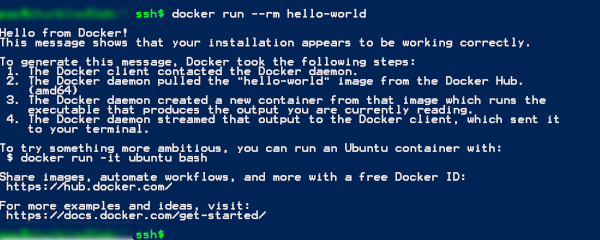
- Ensure that Docker is installed correctly. Run the docker run --rm hello-world command in a console (run as administrator) to verify this. The output of this command should look similar as in the screenshot below.
- Ensure that the ArcGIS Urban Docker container is available. Run the following Docker commands in a console (run as administrator) to verify this:
- docker image ls --all—Lists all Docker images available on your machine. Docker images are used to create Docker containers. The output of this command is expected to list an image in the repository named arcgis-urban with the tag latest, as shown in the screenshot below.

Note:
If there is no image listed called arcgis-urban, rerun the ArcGIS Urban installer in repair mode. Then, reboot the machine and rerun the above Docker command. If the image is still not listed, contact Esri Support Services (for U.S. customers) or your Esri distributor (for customers outside the U.S.).
- docker container ls --all—Lists all Docker containers whether they are running, stopped, or have exited. The output of this command is expected to list a container named arcgis-urban, that is running the image arcgis-urban:latest, as shown in the screenshot below.

Note:
- If there is no Docker image named arcgis-urban, it's expected that there is also no corresponding Docker container available.
- If a Docker image named arcgis-urban is listed but there is no corresponding Docker container, contact Esri Support Services (for U.S. customers) or your Esri distributor (for customers outside the U.S.).
- docker image ls --all—Lists all Docker images available on your machine. Docker images are used to create Docker containers. The output of this command is expected to list an image in the repository named arcgis-urban with the tag latest, as shown in the screenshot below.